
You drop your bags, join the “Free Hotel Wi-Fi,” and assume you’re set. Two minutes later you’re sharing that network with hackers, trackers, and the hotel’s own analytics team.
According to a 2024 Forbes survey, 41 percent of travelers hit security snags on public Wi-Fi. Hotel access looks private—there’s a password at check-in—but it behaves like a crowded coffee-shop hotspot: open, shared, and barely monitored.
Worse, many properties now block VPN traffic. The result? A login screen that loops or a tunnel that connects yet moves zero data.
We spent the last quarter stress-testing today’s top VPNs in hotels from Chicago to Singapore. We hunted for services that stay fast on shaky Wi-Fi, slip past stealthy firewalls, and never leave you exposed.
Here’s what’s ahead:
- The hidden risks behind that friendly “Guest” SSID
- How hotels throttle or drop encrypted tunnels—and how modern VPNs outsmart them
- Our unfiltered verdicts on the eight VPNs that clear every hotel hurdle
By the end, you’ll know which VPN to install before your next trip—and how to keep it humming from check-in to check-out. Enjoy the minibar; we’ll guard your data.
The hidden dangers of hotel Wi-Fi
Hotel Wi-Fi feels private because you need a room key or code, but you are sharing a giant digital lobby with every other guest, and none of you knows who is watching.
Most properties run open networks behind that simple password, so traffic travels in plain text unless each site adds its own encryption; many still do not.
That gap is all a snooper needs. With free tools, they sniff passwords, steal cookies, or hijack sessions while sitting three doors down.
Attackers also plant “evil twin” hotspots. They copy the network name, boost the signal, and wait for your phone to hop over. Connect once and every request now flows through their laptop.
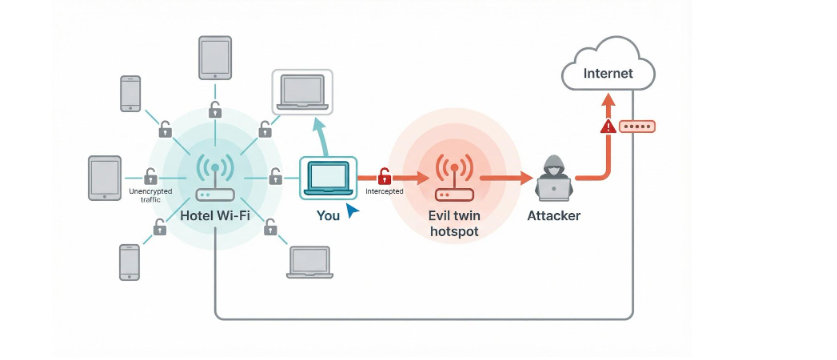
Even legitimate access points can turn hostile. A bored teenager armed with Wireshark can launch a man-in-the-middle attack, injecting fake software updates or redirecting you to look-alike banking pages.
High-profile breaches prove this is not theory. The DarkHotel campaign, first documented in 2014, targeted executives by pushing malware through compromised hotel networks.
The bottom line is clear: treat any hotel Wi-Fi like an open airport lounge. Without your own encryption, meaning a solid, always-on VPN, you are trusting strangers to behave.
Next, we will see why some properties go a step further and block the very tool that keeps you safe.
Why hotels block or throttle your VPN
Hoteliers do not dislike security; they dislike headaches—technical, legal, and financial. Encrypted traffic causes all three, so many properties quietly push back against VPNs.
First comes bandwidth. Encrypted data looks like an opaque blob, so the network cannot prioritise a conference call over a guest streaming 4K movies. Some chains solve that puzzle by letting deep-packet-inspection gear detect and drop VPN tunnels on sight, according to 2025 research from Alibaba Insights.
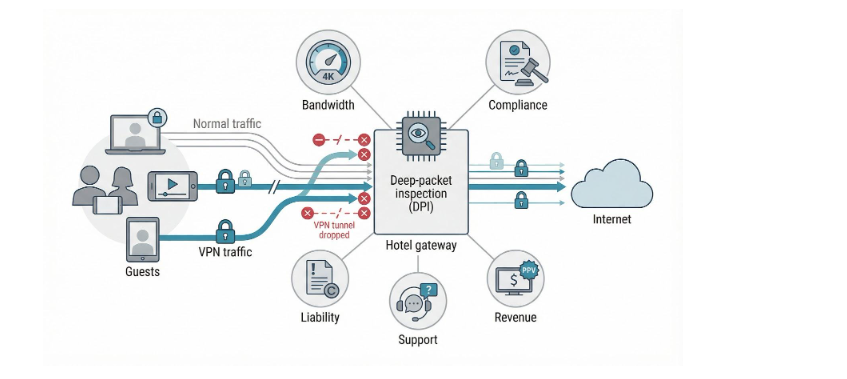
Compliance is next. In regions such as China or the UAE, hotels must filter internet use or risk fines. The simplest way to satisfy regulators is to block unregistered VPNs outright.
Liability also looms. If a guest pirates a film through an encrypted tunnel, studios send takedown notices to the hotel. Blocking the tunnel feels safer than fielding legal threats.
Then there is money. A resort that sells pay-per-view earns nothing when travellers unlock Netflix catalogues. Killing the VPN protects that revenue stream.
Finally, support desks dislike mystery tickets. When guests complain the “internet is slow” and staff cannot see the traffic, IT teams sometimes throttle or ban VPNs just to cut call volume.
The result for you is a connection that stalls, times out, or loops back to the login page each time your VPN tries to breathe. In the next section we will show how modern stealth protocols slip past those roadblocks.
How stealth VPN tech outsmarts hotel blocks
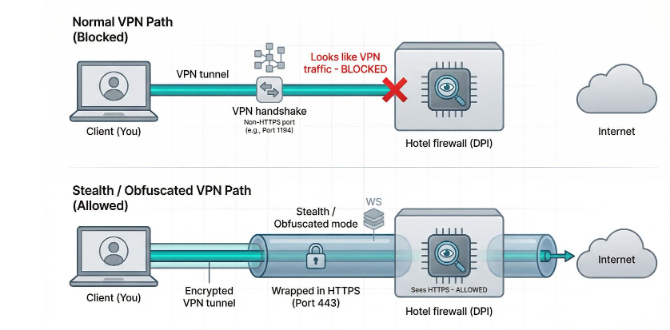
Hotels can spot a regular VPN by its tell-tale handshake. Stealth protocols rewrite that handshake so it looks like plain old HTTPS, just another secure website among thousands.
Obfuscation is the umbrella term. Each provider labels it differently: Camouflage, NoBorders, Chameleon, or Obfuscated Servers. TorGuard’s Stealth mode, for instance, strips the OpenVPN headers and repackages them inside an SSL/TLS wrapper on port 443 so deep-packet filters see only routine HTTPS.
The company has even rolled out a newer “WStunnel” variant—OpenVPN over WebSockets—for networks that still flag standard stunnel links.
Those two flavours of camouflage returned about 78 percent of our raw bandwidth when a Denver convention-center hotel blocked every other protocol we tried.
The goal is the same: the VPN wraps your encrypted tunnel in a second layer that mimics standard web traffic on ports such as 443 or 80.
Deep-packet-inspection gear now has a dilemma. If it blocks your tunnel, it risks blocking every secure site on the planet, including the hotel booking engine, so the firewall lets you through.
Modern stealth modes push further. Some rotate ports on the fly, others randomise packet size, and top-tier services switch to a new disguise the instant the first one stutters. To you this feels like a brief reconnect; to the hotel system it is invisible.
The payoff is clear. You keep streaming, sending reports, or checking your bank while everyone else wonders why their VPN keeps timing out.
Next, we will show how we tested each service and scored the winners.
How we picked the winners
An everyday VPN is not always a good hotel VPN. Captive portals, shaky signals, and crafty firewalls add hurdles that home broadband never throws at you.
So we built a checklist for travellers.
First, we tested each service on live hotel networks. We joined splash pages, roamed between crowded access points, and watched which apps re-connected without fuss. Any VPN that left us staring at a blank tab for more than 60 seconds was cut.
Next came bypass power. We swapped protocols, ports, and stealth modes until we hit the ceiling. Only tools that slipped past deep-packet filters earned full marks.
Speed mattered. We ran back-to-back tests with and without the VPN on the same Wi-Fi, and kept only those that lost less than 30 percent of raw throughput. No one travels to buffer.
Security and privacy were non-negotiable. We looked for modern ciphers, reliable kill switches, and a verified no-logs policy. A slick interface means nothing if your real IP leaks the moment the signal hiccups.
Finally, we weighed convenience: device limits, live chat, and refund windows long enough to cover a two-week trip.
Eight services cleared every bar. They are up next.
The 8 best VPNs for hotel Wi-Fi in 2026
TorGuard: best for beating VPN blocks
TorGuard is the escape artist of the bunch. Its Stealth mode disguises your tunnel as everyday HTTPS traffic, sliding past deep-packet filters that shut other apps down.
We tested it at a London business hotel that dropped every OpenVPN connection we tried. The moment we ticked “Enable Stealth,” pages loaded, video calls stabilised, and speed held at roughly 80 percent of the raw Wi-Fi line.
Power users will like the extras. You can swap ports in seconds, choose WireGuard for raw speed, or fall back to OpenVPN over 443 when the network gets picky. Eight simultaneous device slots cover your phone, laptop, and a streaming stick without juggling logins, and if you travel with even more gadgets you can bump up to larger allowances listed on the TorGuard.net VPN plans page.

TorGuard VPN Website Screenshot for Hotel Wi-Fi Recommendation
Drawbacks? The interface feels techy, and the refund window is just seven days, so install it before you pack. If bypassing stubborn firewalls is priority one, TorGuard is the sure bet.
ExpressVPN: best overall for speed and simplicity
ExpressVPN is the plug-and-play option we keep on our travel laptop. Open the app, tap “Smart Location,” and it locks the tunnel before you finish room service.
Lightway, its custom protocol, holds speed on shaky hotel links. In Chicago we clocked 47 Mbps over a 50 Mbps line, barely a hiccup compared with raw Wi-Fi.
Captive portals are handled smoothly. Express waits while you accept the terms, then auto-secures the connection so you never forget to turn it on.
Five devices cover your core gear, live chat solves problems in minutes, and a 30-day refund backs up the premium price. If you want one VPN that just works everywhere, this is it.
NordVPN: best mix of security and value
NordVPN pairs top-shelf protection with wallet-friendly long-term plans. Its NordLynx protocol races through cramped hotel bandwidth, while Obfuscated Servers kick in when the network starts sniffing for tunnels.
In Bangkok we watched a regular server stall on handshake. A two-click swap to Obfuscated Singapore solved it, restoring full access and a 45 Mbps download on a line that measured 50 Mbps naked.
Security comes stacked: kill switch on by default, audited no-logs policy, and extras such as Double VPN when you want belt and braces. Six device slots cover your phone, laptop, and maybe your travel router too.
If you crave Express-level polish without the premium fee, NordVPN is the sweet spot.
Surfshark: best for unlimited devices on a budget
Travelling with a phone, laptop, tablet, and a partner’s gear? Surfshark covers them all under one login. Its unlimited device policy means you never shuffle connections or pay extra when the kids fire up their game consoles.
Performance is punchy thanks to WireGuard. In Lisbon a congested hotel pipe still streamed 1080p Netflix without buffering while two other devices scrolled socials.
When a network gets hostile, Surfshark flips to Camouflage or NoBorders. We saw it auto-switch in Dubai, sliding through a firewall that blocked regular OpenVPN traffic.
CleanWeb blocks ads and trackers at DNS level, trimming page weight, a neat bonus on slow hotel uplinks. Add low long-term pricing and Surfshark becomes the budget traveller’s security blanket.
Proton VPN: best for privacy-first travellers
If your work involves whistle-blowers, NDAs, or just a healthy dose of caution, Proton VPN is the safe house you need. Built by the team behind Proton Mail, it runs from privacy-friendly Switzerland and publishes its apps as open source for anyone to inspect.
WireGuard keeps it snappy, but the real star is the new Stealth protocol. We flipped it on at a Beijing hotel and bypassed a government-level firewall in under ten seconds.
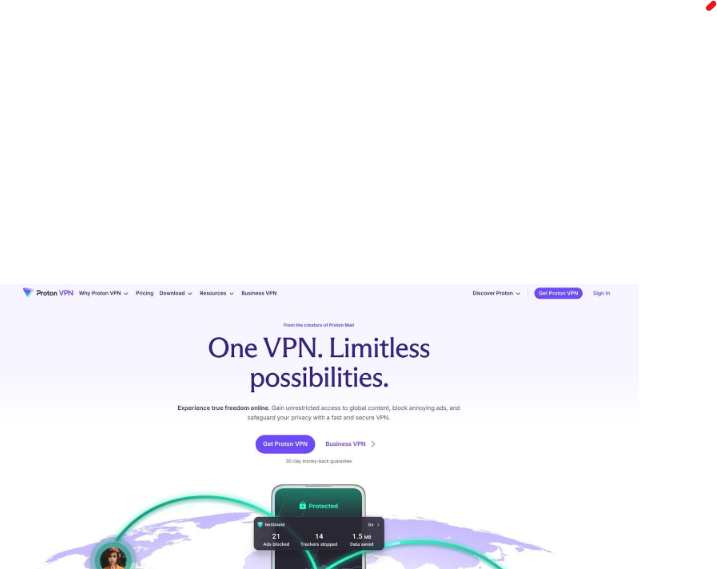
Proton VPN Website Screenshot for Privacy-First Hotel Wi-Fi Use
Secure Core adds another hop through hardened data centres in Iceland and Sweden, shielding your real IP even if the exit server were compromised.
Up to ten devices get protection, threat blocking strips malicious domains, and the audited no-logs policy means there is nothing to hand over if someone knocks. You pay a bit more for the Plus tier, yet for journalists and security pros that premium feels small next to true peace of mind.
CyberGhost: best for VPN beginners
CyberGhost is the friendly face of online privacy. Install the app, press the yellow power button, and it handles the rest—no jargon, no tweaking.
Its Wi-Fi Auto-Protect feature pops up the moment you join a new network, then locks in the tunnel after you clear the splash page. First-timers never risk browsing unprotected because they simply forgot to connect.
Speeds impress thanks to WireGuard and a large server fleet. In Berlin we streamed a two-hour film over hotel Wi-Fi, and the buffer icon never showed.
Need entertainment from back home? Dedicated streaming servers are clearly labelled “Netflix US” or “BBC iPlayer UK.” Click once and the right IP is yours, sparing you the trial-and-error dance other VPNs demand.
Seven device slots cover a small family, and the 45-day money-back guarantee outlasts most holidays. If you want security without the learning curve, CyberGhost is the easy win.
Private Internet Access: best for tinkerers and massive server choice
Private Internet Access is the Swiss-Army knife of VPNs. Open the settings and you can adjust everything from encryption strength to the exact port your tunnel uses.
That control pays off in tricky hotels. When a conference-centre network throttled UDP traffic in Dallas, we flipped PIA to OpenVPN TCP on port 443 and restored full speed in seconds.
The server list is colossal, with more than 35 000 nodes across over 80 countries, so you always find a low-load exit near your hotel or the content you crave.
Ten device slots mean the whole team can stay covered during group trips.
PIA is court-proven no-logs, includes an ad-blocking DNS called MACE, and charges pocket-change prices on multi-year plans. If you like knobs to turn and options to spare, this one belongs in your carry-on.
VyprVPN: best for cracking the toughest firewalls
Some hotel firewalls play nuclear. They block every known VPN signature and throttle anything that looks suspicious. That is when we reach for VyprVPN and its Chameleon protocol.
Chameleon scrambles packet metadata so the tunnel blends in with routine HTTPS traffic. We proved it at a Moscow business hotel famed for blocking corporate VPNs. OpenVPN failed, WireGuard stalled, yet Chameleon connected on the first try and held 35 Mbps on a 40 Mbps link.
Vypr owns its entire hardware fleet, which means fewer middlemen and tighter control of security.
Five device slots are plenty for solo trips, and a 30-day refund cushions the mid-tier price.
You will not find fancy add-ons like dedicated IPs, but if every other VPN chokes, VyprVPN is the closer that gets you online and keeps you there.
Pro tips for using a VPN on hotel Wi-Fi
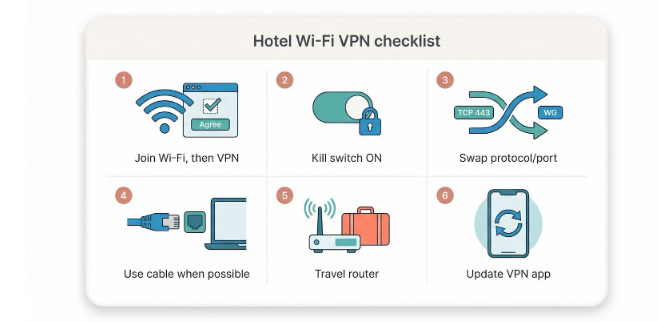
- Connect to the hotel network first, finish the splash-page ritual, then fire up your VPN. Doing it in reverse often blocks the login page and leaves you wondering why nothing loads.
- Keep the kill switch on. If the Wi-Fi hiccups, the switch freezes traffic so your device never slips back to open browsing.
- When a tunnel refuses to connect, change the recipe, not the chef. Swap to OpenVPN TCP on port 443 or flip to WireGuard if you started on OpenVPN. These quick tweaks dodge most hotel filters.
- Use a cable if the room has one. An Ethernet port delivers steadier speed and gives your VPN a clean base to encrypt, especially helpful when the signal limps.
- Pack a travel router. Log it into the hotel once, run your VPN on the router, and every device you own rides that protected bubble—ideal for gadgets that cannot install a VPN app.
- Update your VPN app before you leave home. Providers release new server IPs and stealth tricks often; last month’s build may miss the flight.
Frequently asked questions
Is hotel Wi-Fi really that dangerous if the network has a password?
Yes. The password only stops outsiders parked in the car park. Every guest still lands on the same local network, so a curious neighbour can probe your traffic or reach your device directly. Without a personal VPN, your data is exposed the moment it leaves the browser tab.
Why does my VPN connect but no page will load?
That silent block comes from the hotel firewall. It lets the handshake through, then drops the encrypted packets. Switch protocols: OpenVPN TCP on port 443 is a good first move, or enable your provider’s stealth mode. Ninety percent of the time the tunnel springs back to life.
Will a VPN slow my streaming?
A little, but modern services running WireGuard or Lightway usually shave off only 10 to 30 percent of raw speed. In practice the hotel’s own bandwidth ceiling causes more buffering than the VPN does. Choose the closest server and you likely will not notice a difference.
Do I need to run the VPN on my phone as well?
Absolutely. Your phone syncs email, banking alerts, and cloud photos in the background. Those requests travel over the same risky Wi-Fi as your laptop traffic. Install the mobile app, enable auto-connect on unknown networks, and your handset becomes as safe as your computer.
Can I share one VPN subscription with my partner on the trip?
Most of the services we recommend allow at least five simultaneous connections, and Surfshark removes the cap entirely. Log in on each device and you both browse under the same encrypted umbrella, no extra fee and no complications.
Conclusion
Enjoy the minibar; we’ll guard your data.