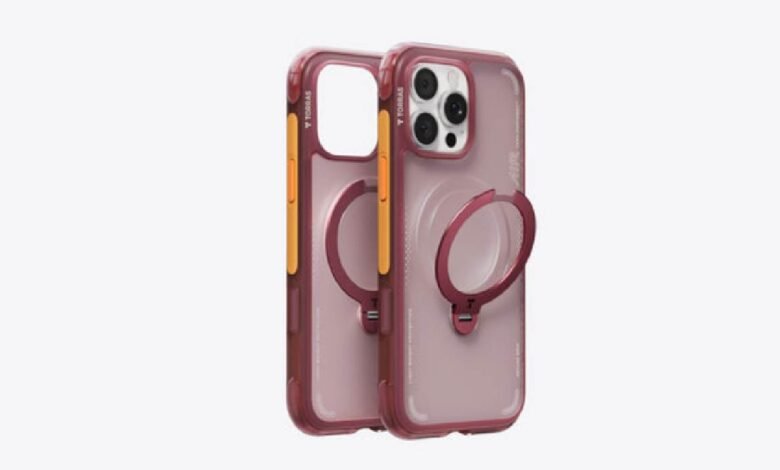
The iPhone 16 Pro represents a significant investment, and protecting it without sacrificing the features you paid for is a real challenge. With wireless charging becoming a daily essential and MagSafe technology redefining convenience, the wrong case can quietly undermine both. Too thick, and charging slows to a crawl. Too rigid, and magnet alignment becomes a frustrating guessing game.
Finding a case that checks every box — reliable drop protection, wireless charging compatibility, and materials that won’t turn yellow six months in — feels harder than it should be. That’s exactly what this guide addresses. Whether you’re drawn to the versatility of an iPhone 16 Pro magnetic kickstand case, searching for slim iPhone 16 Pro cases that don’t interfere with charging, or prioritizing anti-yellowing materials for a clean look that lasts, the right information makes all the difference.
This article walks you through how case materials and thickness affect wireless charging, what protective features actually matter, and how to compare your options confidently. By the end, you’ll have a clear, practical framework for choosing a case that protects your phone and works with it — not against it.
Understanding Wireless Charging Compatibility with iPhone 16 Pro Cases
Case selection has a direct, measurable impact on how efficiently your iPhone 16 Pro charges wirelessly. The physics are straightforward: wireless charging relies on electromagnetic induction between your phone’s coil and the charging pad, and anything that interrupts or weakens that field slows the process. Case thickness is the most common culprit. Cases thicker than 3mm can noticeably reduce charging speed, and anything beyond 5mm may prevent charging altogether on standard Qi pads.
Material matters just as much as thickness. Most plastics and TPU are transparent to wireless signals and work fine, but cases with metal components — decorative plates, reinforced frames, or embedded magnets not designed for MagSafe — can block or scatter the electromagnetic field entirely. Even a thin metal ring can misalign the charging coil enough to generate heat instead of power.
MagSafe certification is your clearest signal of guaranteed compatibility. Apple’s MagSafe ecosystem uses a precise ring of magnets to snap your iPhone into perfect alignment with compatible chargers, eliminating the guesswork. When evaluating cases, look specifically for MagSafe-certified or MagSafe-compatible labeling, which confirms the case has been tested to maintain both magnet alignment and charging efficiency. Brands like TORRAS design their iPhone 16 Pro cases with this certification in mind, ensuring the magnet array doesn’t compromise charging speed or coil alignment. If you’re unsure about an existing case, a simple test works: place your phone on a MagSafe charger and check whether the charging animation appears immediately and the reported wattage matches expectations. Slow charging or no connection is a reliable indicator that your case is interfering.
Essential Features for iPhone 16 Pro Case Protection
Protection isn’t a single feature — it’s a combination of design choices that work together to keep your phone intact through daily wear and unexpected drops. When evaluating cases, two concerns come up repeatedly among iPhone 16 Pro owners: how well a case absorbs impact, and whether a clear case will still look good after six months of use. Both are worth understanding before you buy.
Drop Protection Technologies Explained
Effective drop protection comes down to materials and structure. Polycarbonate provides a rigid outer shell that distributes impact force across a wider surface, while TPU (thermoplastic polyurethane) layers underneath absorb and dissipate the remaining energy. Cases combining both offer meaningfully better protection than single-material designs. Look for MIL-STD-810G certification, which indicates the case has passed standardized drop tests from multiple angles and heights. Raised bezels around the screen and camera module are equally important — these lips keep glass surfaces from making direct contact with flat surfaces during a face-down drop, which is where most screen damage actually occurs.
Anti-Yellowing Materials for Long-Lasting Aesthetics
Clear cases are a popular choice for showing off the iPhone 16 Pro’s finish, but standard TPU has a well-known weakness: it yellows within months due to UV exposure and oxidation. This isn’t just cosmetic — it signals material degradation. Higher-quality cases address this through UV-resistant TPU formulations or proprietary coatings that stabilize the polymer structure against light and heat exposure. Some manufacturers use a dual-layer approach, combining a treated clear back with a reinforced frame, which slows discoloration significantly. When shopping, look specifically for cases marketed with anti-yellowing guarantees or UV-resistant materials rather than simply “clear” cases, as the distinction reflects a real difference in how the material is engineered to age.
Spotlight on the iPhone 16 Pro Magnetic Kickstand Case
Among the growing range of iPhone 16 Pro cases, the magnetic kickstand case stands out as one of the most practical all-in-one solutions available. The core appeal is simple: a built-in kickstand lets you prop your phone at a comfortable viewing angle for video calls, streaming, or following a recipe — without needing a separate stand or holder. But what separates a well-designed magnetic kickstand case from a gimmick is how seamlessly it integrates with MagSafe wireless charging.
The key is magnet placement. Quality kickstand cases are engineered with a MagSafe-compatible magnet array that snaps precisely onto chargers and MagSafe accessories without the kickstand mechanism interfering with alignment. This means you can charge wirelessly while the case is attached — no removal required, no hunting for the right position on the pad. The magnets also enable attachment to MagSafe wallets, car mounts, and other ecosystem accessories, effectively turning one case into a modular system.
Compared to standard iPhone 16 Pro cases, the magnetic kickstand design adds genuine daily utility without meaningful trade-offs in protection. Most quality versions maintain the dual-layer polycarbonate and TPU construction that meets drop protection standards, and the kickstand itself folds flush when not in use, keeping the profile slim enough for pocket carry. For users who frequently watch content on their phones or work at a desk, this type of case resolves the constant tension between wanting a case that protects the phone and one that actively enhances how you use it.
Step-by-Step Guide to Choosing Your iPhone 16 Pro Case
Assess Your Needs and Priorities
Start by honestly evaluating how you use your phone. Do you frequently charge wirelessly at your desk or nightstand? Do you work in environments where drops are likely? If aesthetics matter and you want to show off your iPhone’s finish, anti-yellowing becomes a priority. Mapping your actual habits — not your ideal ones — gives you a clear filter for eliminating cases that look good on paper but won’t serve your daily reality.
Evaluate Case Options Based on Key Criteria
Once your priorities are clear, compare cases against four concrete criteria: wireless charging compatibility (look for MagSafe certification), drop protection rating (MIL-STD-810G is the benchmark), anti-yellowing properties (UV-resistant TPU or proprietary coatings), and bonus features like a magnetic kickstand. Read verified buyer reviews specifically mentioning long-term use — early impressions rarely reveal yellowing or magnet degradation. Cross-reference at least two sources before shortlisting.
Make an Informed Decision and Test
Buy from retailers offering a return window of at least 14 days. Once the case arrives, immediately test wireless charging by placing your phone on a MagSafe charger and confirming the connection animates instantly at full wattage. Check magnet snap strength if applicable. If anything feels off — slow charging, loose fit, poor alignment — return it confidently rather than settling. The right case should work correctly from day one.
Comparing Top iPhone 16 Pro Case Options in the Market
Not every case suits every user, and understanding the main categories helps you zero in on what actually fits your lifestyle. The four most relevant types for iPhone 16 Pro owners each make a different set of trade-offs worth knowing before you spend.
Magnetic kickstand cases are the most versatile option on the market right now. They combine MagSafe alignment, hands-free viewing capability, and solid drop protection in a single package — making them ideal for users who want one case that handles multiple scenarios. The trade-off is a slightly thicker profile compared to minimalist options, though most quality versions, including options from TORRAS, remain pocket-friendly while keeping the kickstand mechanism low-profile when folded.
Slim cases optimized for wireless charging prioritize low profile and charging efficiency above all else. These work best for users who charge wirelessly multiple times a day and prefer a near-naked feel. Protection is adequate for everyday handling but won’t satisfy anyone working in physically demanding environments.
Rugged cases are built for maximum drop protection, often featuring multi-layer construction and reinforced corners. They’re the right call for outdoor use or job sites, but their added bulk can reduce wireless charging efficiency and MagSafe snap strength, so compatibility verification matters more here.
Clear cases with anti-yellowing treatments appeal to users who want to showcase the iPhone 16 Pro’s design. When made with UV-resistant TPU, they hold up well aesthetically over time. The key is distinguishing genuinely UV-stabilized materials from standard clear TPU, which will discolor regardless of how carefully you handle the phone.
Finding the Right iPhone 16 Pro Case for Your Needs
Choosing the right iPhone 16 Pro case isn’t just about aesthetics — it’s about making sure your case actively supports how you use your phone every day. Wireless charging compatibility depends on case thickness and material, with MagSafe certification offering the clearest guarantee that alignment and charging speed won’t be compromised. Protection requires both polycarbonate rigidity and TPU absorption working together, backed by MIL-STD-810G standards and raised bezels that shield your screen and camera. For clear cases, UV-resistant materials separate genuinely durable options from those that will yellow and degrade within months.
Among available options, the iPhone 16 Pro magnetic kickstand case stands out for users who want protection and everyday functionality in one package — combining MagSafe compatibility, hands-free viewing, and solid drop protection without forcing trade-offs. For those who prefer a different approach, slim wireless charging cases, rugged builds, and anti-yellowing clear cases each serve distinct needs equally well when chosen thoughtfully.
Use the step-by-step framework in this guide: assess your real usage habits, evaluate options against concrete criteria, and test your case immediately upon arrival. Your iPhone 16 Pro deserves a case that protects it reliably and works with its features — not one that quietly gets in the way. The right choice is out there; now you have the tools to find it.