It’s Tuesday, ninety new products are staged and waiting to go live, a TikTok campaign is due Thursday, and your one designer is already buried under three other projects. The video clips your ad team asked for last week aren’t coming — not this week, maybe not next week either.
If that sounds like a normal Tuesday rather than a crisis, keep reading. Because the constraint behind it — not enough hands to produce motion content at the pace a catalog actually needs — isn’t really a structural limit anymore. It’s become a solvable operations problem, and the solution is simpler than most teams assume.
Four Pressures Colliding at Once
Catalogs keep growing. Hundreds, sometimes thousands of SKUs cycling through weekly updates. Platform requirements keep multiplying too — Shopify, TikTok Shop, Amazon, Meta, YouTube Shorts, each with its own aspect ratio and spec sheet. Turnaround windows have shrunk to under 48 hours in a lot of operations. And buyer habits have shifted hard toward motion: most shoppers now watch a video before buying something, and product pages with motion content routinely see double-digit conversion lifts.
None of these pressures are new individually. What’s new is all four landing on the same team at the same time. And the team that handles it well isn’t the one with the most talented designer — it’s the one that’s figured out how to ship a motion asset with every single SKU, on schedule, without routing each one through a creative team.
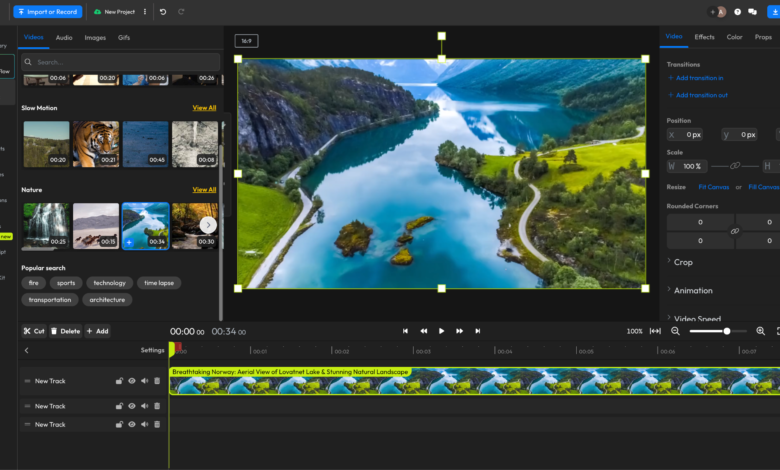
A tool like ImageToVideoAI is what’s made that realistic — turning product photography you already have into ready-to-deploy video clips in minutes, at whatever scale the catalog demands, without an editor anywhere in the loop.
Why This Has Become an Operations Job, Not a Creative One
The traditional route for video runs through a creative team. A brief goes in. Somewhere between two days and two weeks later, depending on how backed up the queue is, an edit comes out.
That pipeline is fine for a flagship campaign. It collapses completely when the actual need is catalog-wide coverage, where the volume required is simply bigger than any design team can sustainably absorb.
AI image-to-video tools cut that dependency out entirely. Someone with zero editing background can take a batch of product photos, pick a motion preset, and walk away with deployment-ready clips in the same sitting. The bottleneck shifts from “how fast can creative turn this around” to “do we have decent source photos” — and most catalogs already do.
The Workflow, Start to Finish
Step one — gather your images. Upload single product shots or hand over entire folders for batch processing. High-resolution images with clean backgrounds produce the sharpest results, though most teams already have what they need sitting in existing studio archives.
Step two — pick a motion preset. Slow drift, parallax separating foreground from background, gradual zoom, light rotation — the options are limited on purpose. Across nearly every ad test, the same pattern holds: restrained motion beats dramatic motion. Two or three presets, applied consistently, become a recognizable look for a product line.
Step three — generate the clip. The system processes the still and outputs a short video, usually three to six seconds, ready for the placements where motion actually earns attention: social ads, marketplace listings, hero banners, product pages.
Step four — export for each destination. Different platforms want different shapes:
- 9:16 for TikTok, Reels, and Shorts
- 1:1 for feed placements
- 16:9 for YouTube pre-roll and website banners
- 4:5 for Instagram and Facebook reach formats
Preset exports take care of the resizing automatically, so nobody’s manually cropping the same clip five different ways.
Step five — push it live. Finished clips go directly to ad managers, listing platforms, or social schedulers. No handoff to a separate creative team, no waiting on a round of approvals.
What used to require a creative brief, an editor, and a multi-day turnaround now fits into one sitting. For a catalog of five hundred SKUs, that’s the difference between a months-long production slog and something wrapped up in an afternoon.
What the Numbers Actually Look Like
Time: Traditional editing runs 30 to 90 minutes per clip. The AI workflow runs under two minutes per clip. Across a 200-SKU batch, that’s roughly two weeks of editor time collapsed into a single afternoon.
Cost: Outsourced editing typically runs $25 to $50 per clip. The AI route brings that down to a fraction of a dollar, which is really what makes full-catalog coverage financially realistic for the first time.
Testing speed: Paid social rewards creative volume above almost everything else. A brand pushing 40 to 80 video variants weekly is running far more simultaneous tests than one stuck at 8 to 12 — and that gap widens every week it continues.
Coverage: The biggest shift isn’t speed or cost, it’s breadth. Batch processing makes it realistic to give every SKU a video — seasonal items, long-tail variants, the categories that never made the cut under the old system.
A Quick Look at How This Plays Out: A Skincare Brand’s Numbers
A mid-sized skincare brand running TikTok Spark Ads ran into the same wall most operators eventually hit: their freelance editor could turn out 8 to 10 product videos a week, but the ad team needed at least 40 variants weekly to test meaningfully. That gap wasn’t going to close on its own.
With 120 packaging and lifestyle photos and a three-week deadline, the team ran their whole batch through an AI workflow, applied one consistent drift preset across the board, and exported straight into TikTok’s 9:16 format.
| Metric | Old Workflow | AI-Powered Workflow | |
| CTR (TikTok Spark Ads) | 0.9% | 1.7% | |
| Cost per video | ~$35 (freelancer) | Under $1 | |
| Weekly creative output | 8–10 videos | 40+ videos | |
| Time per video | ~45 minutes | Under 2 minutes |
Keeping Quality Consistent at Scale
Start with the cleanest source images available. Motion can elevate a well-shot product photo, but it won’t fix soft focus, compression artifacts, or a messy background — those flaws just scale up along with everything else.
Keep the motion understated. Gentle drift and light parallax consistently beat aggressive zoom or rotation in actual ad performance. The goal is holding attention on the product, not demonstrating what the software can do.
Match the format to where it’s headed — 9:16 for TikTok, Reels, and Shorts; 1:1 for feed; 16:9 for YouTube and web placements.
Stick with one preset per product line. A consistent camera-drift look across a skincare collection reads as intentional design. Mixing styles SKU to SKU just looks sloppy at scale.
And resist the urge to over-engineer it. More effects rarely mean better performance — the goal is enhancing what’s already a good product photo, not redesigning it from scratch.
Where This Is Headed Over the Next Year
A few shifts are already underway. Catalog-wide video generation is replacing the old one-clip-at-a-time approach, with teams that’ve adopted batch AI workflows now shipping more motion content in a week than traditional setups managed in a quarter.
Creative testing volume is scaling past what any human editing team could realistically support — brands running 60-plus variants weekly against a single campaign are operating in a different tier entirely from those stuck at 8 to 12.
And video-first product pages are quickly becoming the baseline expectation rather than a premium add-on. It’s already visible in the highest-performing channels, and it’s likely to be standard across most categories within the next year or so.
Teams that build this into their operations now will run leaner, ship faster, and hold onto a testing advantage that keeps compounding the longer they run it.
Final Thought
The production problem behind catalog-wide video has effectively been solved. What’s left is a workflow decision.
ImageToVideoAI’s product photo to video tool can cut video production time by more than 95%, which makes motion content across an entire catalog something a small team can actually pull off — and frees up creative time for the campaigns that genuinely need a human touch instead of repetitive editing work.
The brands that build this into their operations in 2026 won’t just be moving faster than everyone else. They’ll be testing more, launching more, and reacting to market shifts on a timeline that teams still relying on manual production simply can’t match.
One More Question Worth Answering
Can AI honestly turn a still product photo into something usable for e-commerce?
Yes. Current image-to-video tools apply realistic camera movement, parallax, and ambient motion to a still photograph, producing three-to-six-second clips suited for TikTok Spark Ads, Reels, Shorts, Amazon A+ content, and product pages. For packaging, lifestyle, and flat-lay photography specifically, the output is clean enough that most viewers never clock it as AI-generated.