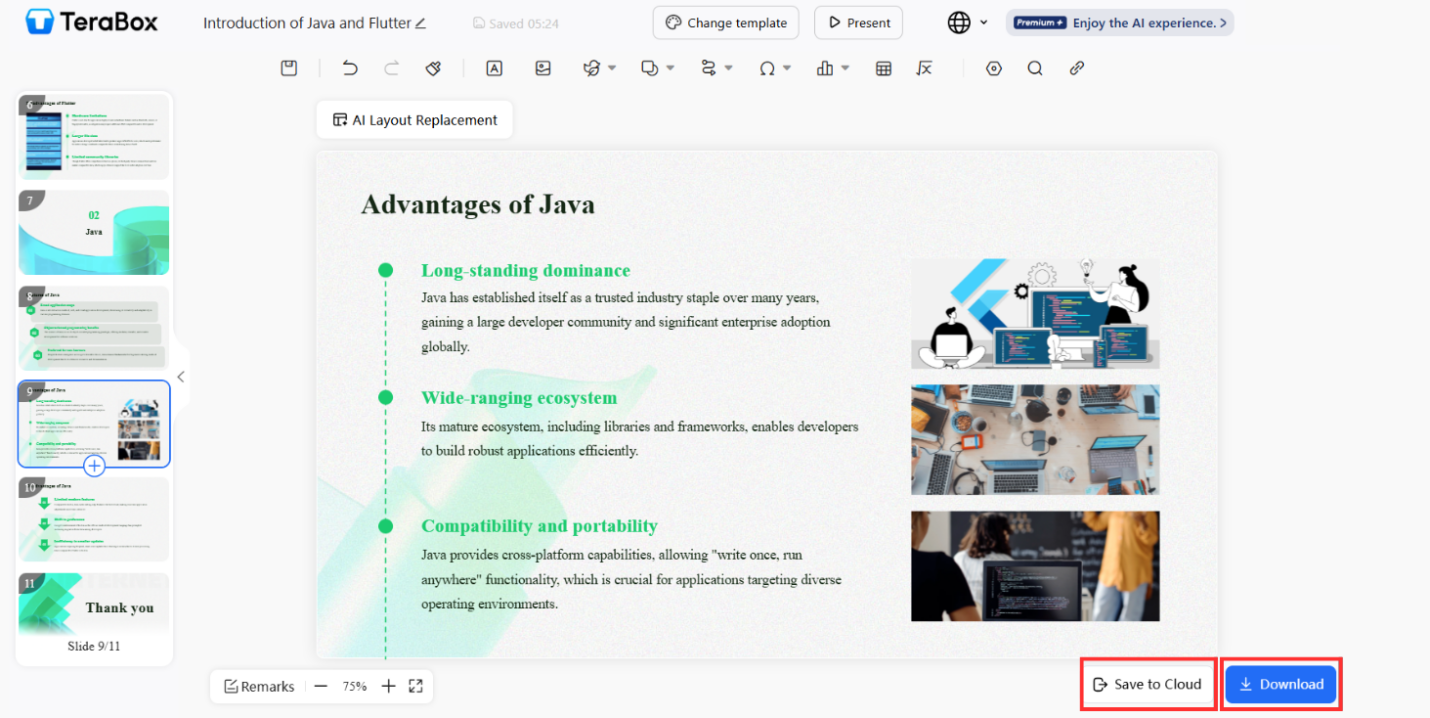
Creating engaging and visually appealing PowerPoint slides is quite a task. It requires a lot of mental strength, which often causes a creative block. Thus, slowing down the entire process. Hence, you are left with close deadlines with either unfinished or very boring results.
This is when AI for presentation tools jumps in for the rescue. With these tools, there is no need to put in hours of work. Even a non-designer can build visually appealing slides within a few minutes.
TeraBox is one of the best tools in this regard. Launched in 2025, the tool is beneficial for both non-designers and experts. It helps users design clean slides, build layouts, and polish content automatically. This makes it simple for anyone to understand how to create a PowerPoint presentation without stress or long hours.
Below is a full guide on how this new AI era is changing presentations.
Rethinking PowerPoint Creation in the AI Era
Creating presentations used to be very slow and stressful. From picking the colors, figuring out the layouts, to working on visuals, you have to design every slide manually.
You even have to select the fonts and fix spacing continuously on a repeat, which can be extremely boring and annoying. This causes mental exhaustion. However, time has changed. Now, AI tools have transformed this process completely.
How AI Makes PowerPoint Easier
Teachers, business teams, and students have to generate several slides very often. It used to take immense time and energy.
However, things have changed after the introduction of a presentation maker backed by AI. With AI, business teachers and students can work faster and better. It helps generate slides by providing a clean layout, beautiful color harmonious to the topic, and amazing fonts.
This is why many people now prefer using an online presentation generator. The steps are simple, and the results look more professional.
Why AI is Transforming Slide Creation
- It removes design stress
- It builds content structure
- It improves readability
- It works fast
- It helps non-designers look professional
AI tools like TeraBox have become a lifesaver. Not only do they save time, but they also increase efficiency and deliver better results. The tool has a very simple interface, which makes it easy to use with professional results. Hence, it accommodates both a beginner, just starting to learn, and an expert who wants to save time without giving up on visuals.
How AI Analyzes and Enhances Your Content
The best thing about these AI tools is that they do not just create slides; they understand your input. The tool analyzes your topic, looks at your text, and decides how to display it best.
Therefore, by understanding the meaning and emotion of the text, it ensures the tone and visuals are relevant. This is what makes modern AI for presentation tools powerful.
What AI Looks For
- Main ideas
- Supporting points
- Keywords
- Visual cues
- Tone of content
AI not just generates slides, it makes sure it conveys emotions and engages with the viewer. Therefore, it studies your content and builds slides that feel clear and balanced.
How AI Improves Your Slides
- It shortens long text
- It adds bullet points
- It highlights key ideas
- It chooses modern layouts
- It selects better spacing
- It suggests images
This makes your slides look more organized. It also helps viewers understand your message faster.
Hands-On Guide — Creating Smart Slides with TeraBox
Here is a simple guide on how to create a PowerPoint presentation quickly with TeraBox.
Step-by-Step Process
Step 1: Log in to TeraBox
First, navigate to TearaBox and log in or sign up if you do not have an account. You can log in on PC or the web version.
Step 2: Upload Your Document
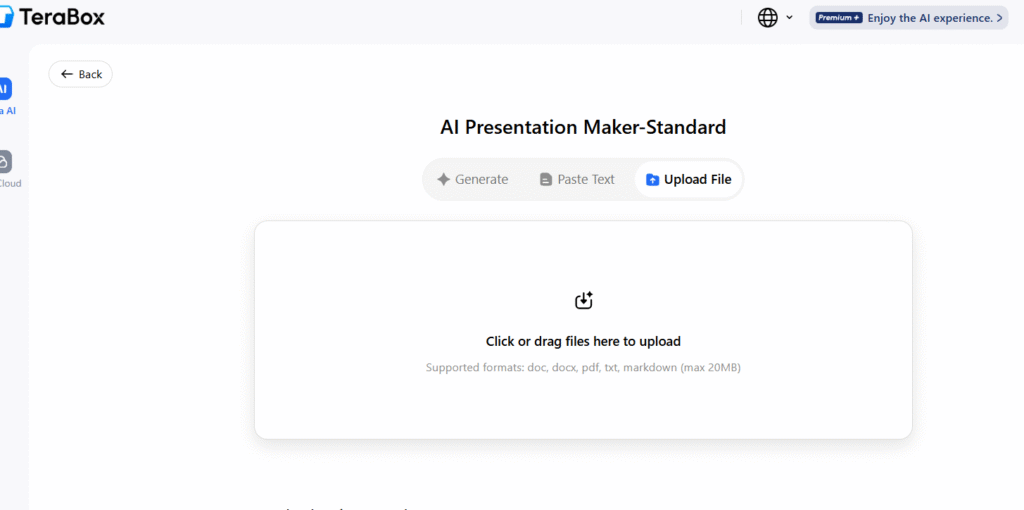
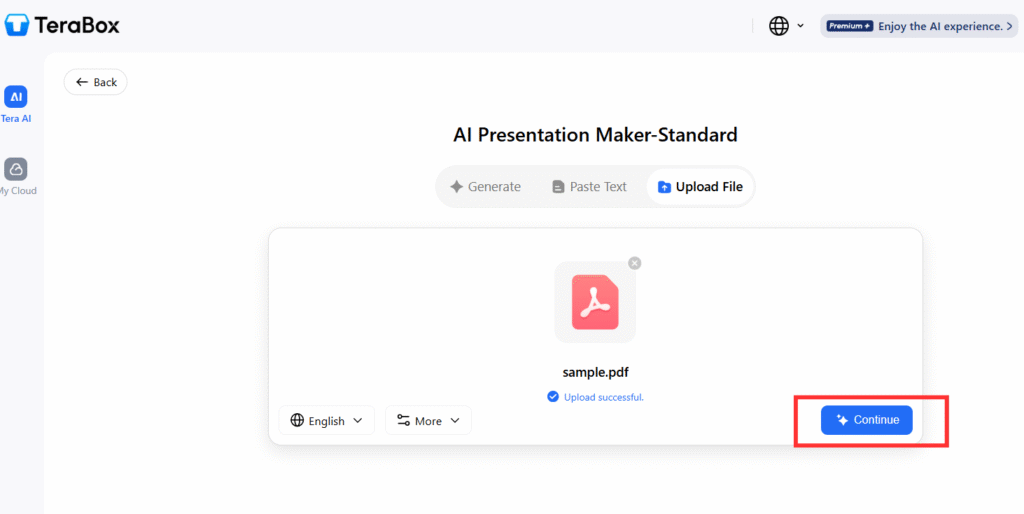
Provide the tools with your title, outline, or text. You can upload a document from your device and it will get uploaded within a few seconds. Once its uploaded, click on “Continue”.
Step 3: Generate Slides
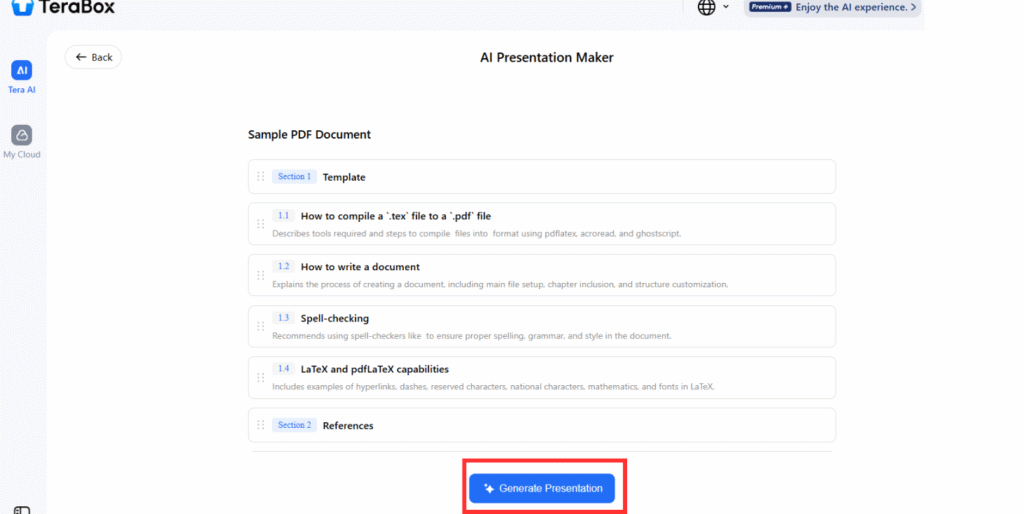
Once you have uploaded or pasted the document and chosen the template, it’s time to generate the slides. For this, click “Create”. AI will first give you an outline based on the key points of the topic. You can add a section if you want, or continue to go with the provided ones. AI will build smart slides based on your input.
Step 4: Choose a Style
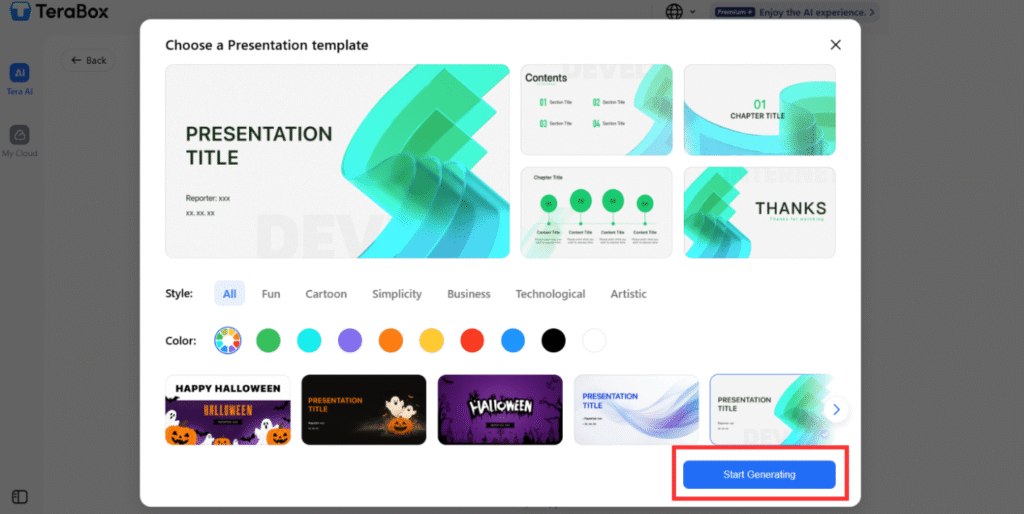
TeraBox offers many designs and engaging templates to choose from. This means you don’t have to work from scratch, which could have been very difficult and time-consuming. TeraBox templates offer a number of different styles like modern, clean, corporate, minimal, and creative.
Step 5: Review and Edit
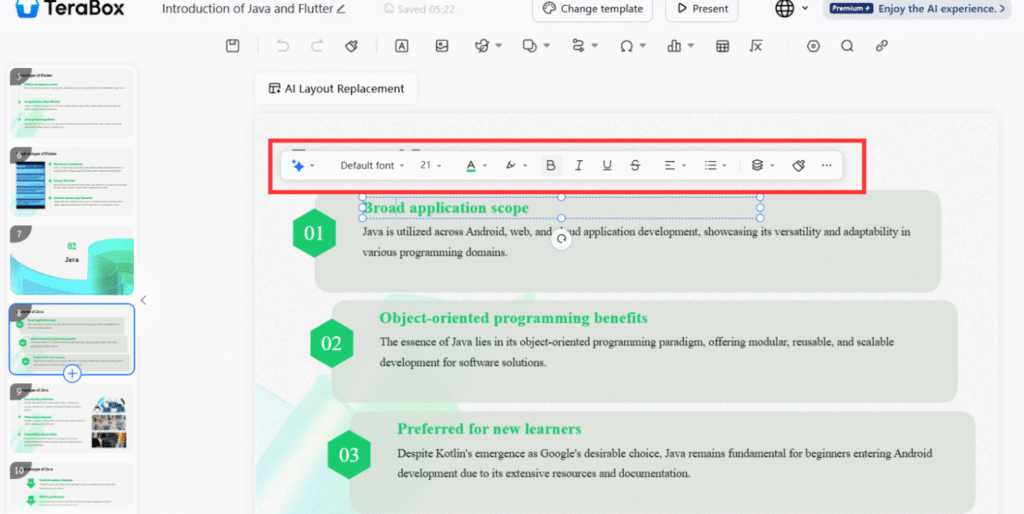
Once the AI has generated the slides, you can review them. You can adjust text, colors, layouts, fonts, and images. TeraBox makes editing simple with drag-and-drop tools.
Step 6: Download Your Presentation
After you are satisfied with the results, save your file in PowerPoint format. One great thing is that you can also store or save it in the TeraBox cloud storage.
Future of AI in Presentation Creation
The future is exciting. AI is making presentation creation smarter every year.
What We Can Expect
- More advanced layouts
- Auto image generation
- Voice-to-slide creation
- Real-time design suggestions
- AI-powered templates
- Better storytelling structures
- Automatic translation for slides
Why This Matters and Who It Benefit
Students: Students save a lot of time and work way faster, which saves them from missed deadlines.
Teachers: Teachers present better and work more efficiently.
Business teams: Business teams work faster, which aids growth and progress.
Creators: Creators enjoy improved quality with appealing visuals.
Non- designers: Non-designers make beautiful slides without needing any technical or design skills.
The next generation of AI for presentation tools will help more people understand how to create PowerPoint slides with zero effort.
Tips and Best Practices for Using Free AI Presentation Makers
Using an online presentation generator is very simple. However, you can get even better results if you know some important points. Here are tips to follow for optimum and efficient results.
Best Practices
- Start with a clear topic:Ensure to give nice and detailed input for clarity.
- Use short sentences:Don’t cause confusion by over explaining the topic.
- Add bullet points:Provide structure (intro, body, end).
- Choose clean fonts:Go with templates with clear fonts for clarity.
- Use matching colors:Color conveys emotions, so choose wisely and select those that align with your topic.
- Keep images relevant:The images must be relevant to the topic.
- Leave enough white space:Make sure that the text and other elements are structured and properly aligned with correct spacing.
- Always preview your slides:Personalize the final slides to make them accurate to your liking.
These small steps are very helpful and assist the AI to give you more accurate and professional designs, especially when learning how to create a PowerPoint presentation from scratch.
Final Words
Learning how to create PowerPoint slides is no longer a hard task. It has become way easier and efficient. There are tools that have made it possible to convert text into slides very fast. Therefore, with TeraBox and other AI for presentation tools, anyone can build clear, professional, and visually beautiful slides in minutes. Just pick from the already made templates and do adjustments for customizations, and that’s it, your slides are ready.
Above, we have discussed step-by-step guides for using TeaBox effectively. So make sure to read from start to finish. AI helps turn ideas into structured content. It fixes design problems, speeds up productivity, and makes presentations accessible to everyone: students, workers, teachers, and creators.