Every year, small businesses lose thousands of dollars to time theft, buddy punching, and the simple human errors that plague manual attendance tracking. A forgotten punch-in here, a rounded-up timesheet there—these seemingly minor issues compound into significant payroll inaccuracies and administrative headaches that drain resources from growing companies. Biometric time clocks have emerged as a powerful modern solution, using unique biological identifiers to automate employee attendance and streamline shift management with unprecedented accuracy. Unlike traditional methods that rely on easily shared PINs or swipe cards, biometric systems tie each clock-in directly to the individual employee, making fraud virtually impossible. Whether you run a retail shop with rotating shifts or a warehouse with dozens of hourly workers, choosing the right biometric time clock can transform how you track attendance and manage your workforce. This guide walks you through everything you need to know—from understanding the technology and its benefits to evaluating features and selecting the perfect system for your specific business needs.
What Are Biometric Time Clocks and Why They Matter for Attendance Management
Biometric time clocks are electronic devices that identify employees through their unique biological characteristics to record work hours automatically. Rather than relying on passwords, ID badges, or manual sign-in sheets, these systems scan physical traits—such as fingerprints, facial geometry, or iris patterns—to verify exactly who is clocking in or out. Each scan is matched against a stored template in seconds, creating a tamper-proof attendance record tied to a specific individual.
The technology represents a dramatic leap from the punch card systems that dominated workplaces for over a century. Those early mechanical clocks gave way to magnetic stripe cards in the 1980s and PIN-based terminals in the 1990s, but each generation still depended on something an employee carried or remembered—something that could be lost, forgotten, or shared. Biometric identification removes that vulnerability entirely because the credential is the person themselves. For small and medium-sized businesses, this evolution matters enormously. These companies often lack dedicated HR departments to audit timesheets or investigate discrepancies, making automated accuracy not just convenient but essential for maintaining fair labor practices and controlling costs.
The Key Benefits of Biometric Attendance Systems for Business Owners
The most immediate advantage of biometric attendance systems is the complete elimination of buddy punching—the practice where one employee clocks in on behalf of an absent coworker. Studies estimate that buddy punching alone costs U.S. employers hundreds of millions annually, and for a small business operating on thin margins, even a few instances per week can meaningfully impact the bottom line. Because biometric systems require the actual physical presence of each employee, this form of time theft simply cannot occur. Every recorded punch is verified and authentic, giving business owners confidence that payroll reflects actual hours worked.
Beyond fraud prevention, these systems dramatically simplify how managers handle employee shifts. Real-time data flows directly from the clock to your attendance management software, showing exactly who is on-site, who arrived late, and which shifts remain uncovered. This visibility allows supervisors to make staffing adjustments on the fly rather than piecing together information from paper logs hours after the fact. For businesses running multiple shifts or managing part-time workers with variable schedules, this instant awareness translates into smoother daily operations and fewer scheduling conflicts.
The administrative workload reduction compounds over time. Managers no longer spend hours each pay period reconciling timesheets, chasing down missing punches, or resolving disputes about hours worked. Payroll processing becomes faster and more accurate because the data feeding into it is clean from the start. Additionally, biometric systems create a secure audit trail that proves invaluable during labor disputes or compliance reviews, protecting business owners from costly legal challenges while fostering a workplace culture built on transparency and accountability.
Essential Features and Technologies in Modern Biometric Time Clocks
Selecting the right biometric time clock requires understanding both the identification technologies available and the hardware and software ecosystem that supports them. Not all systems are created equal, and the best choice depends heavily on your workplace environment, workforce size, and existing technology infrastructure. The features you prioritize will directly impact how smoothly the system integrates into daily operations and how quickly employees adopt it.
Comparing Biometric Methods: Fingerprint, Face Recognition, and More
Fingerprint scanning remains the most widely deployed biometric method in time clocks, offering a strong balance of accuracy, speed, and affordability. Employees place a finger on an optical or capacitive sensor, and the system matches the scan against stored templates in under a second. However, fingerprint readers present challenges in environments where workers handle chemicals, wear gloves, or have worn fingerprints from manual labor—construction sites and commercial kitchens are common examples where recognition rates can drop.
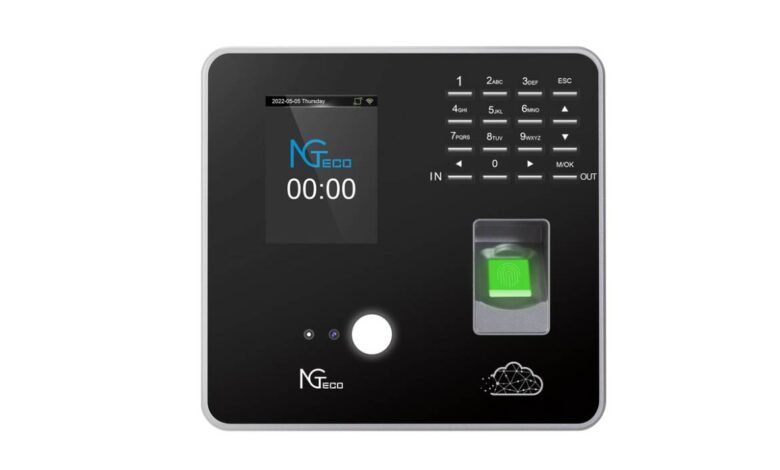
Face recognition technology has gained significant ground in recent years, particularly since the pandemic heightened awareness around touchless solutions. Hardware manufacturers like NGteco have developed systems that use infrared cameras or structured light to map facial geometry, allowing employees to clock in without physical contact. This makes them ideal for healthcare facilities, food processing plants, or any environment where hygiene is paramount. Modern face recognition clocks perform well even when employees wear glasses or change hairstyles, though very low lighting conditions or full face coverings can occasionally affect accuracy. Other biometric options include iris scanning, which offers extremely high precision but at greater cost, and palm vein recognition, which reads vascular patterns beneath the skin for a contactless yet highly secure verification. When choosing a method, consider your work environment first—if employees routinely have dirty or wet hands, touchless options will deliver more consistent results and fewer frustrated workers at the clock.
Hardware and Software Considerations: Touchscreen Interfaces and Integration
The physical device matters more than many buyers initially realize. A responsive touchscreen interface reduces queue times during shift changes and minimizes training requirements because employees interact with clear visual prompts rather than confusing button sequences. Look for displays large enough to show confirmation messages clearly and durable enough to withstand high-traffic mounting locations near entrances or break rooms.
On the software side, the time clock is only as valuable as its ability to communicate with your broader systems. The best biometric clocks integrate directly with popular attendance management platforms and payroll software, eliminating the need for manual data exports or duplicate entry. Cloud-based systems offer the advantage of real-time access from anywhere—managers can monitor attendance from their phone—while on-premise solutions may appeal to businesses with strict data security requirements or unreliable internet connectivity. Evaluate whether the software supports your specific scheduling complexity, including split shifts, overtime rules, and multi-location management, before committing to any hardware.
A Step-by-Step Guide to Choosing the Right Biometric Time Clock
Understanding the technology and its benefits is only half the equation. The real challenge lies in translating that knowledge into a confident purchasing decision that serves your business for years to come. The following steps provide a structured framework to move from initial assessment through successful deployment, ensuring you invest in a system that genuinely fits rather than one that looks impressive on paper but frustrates in practice.
Step 1: Assess Your Specific Business Needs and Workforce
Begin by documenting the fundamentals of your operation. Count your total employees across all locations, then map out your shift patterns—do you run a single daytime schedule, rotating shifts, or a complex mix of full-time and part-time workers with variable hours? This determines how much scheduling sophistication your system needs and how many clock-in events it must handle during peak transition periods. Next, walk through your physical workspace. Identify where employees naturally enter and exit, because placing biometric clocks along these paths minimizes disruption and prevents bottlenecks. A warehouse with three entry points needs multiple devices, while a single-door retail shop may only require one. Also consider environmental factors at those locations—temperature extremes, dust, moisture, or lighting conditions—since these directly affect which biometric method will perform reliably day after day.
Step 2: Research and Compare Biometric Time Clock Options
With your requirements defined, begin evaluating biometric fingerprint time attendance clocks that match your profile. Look beyond manufacturer marketing materials and seek out reviews from businesses similar to yours in size and industry. Pay particular attention to comments about long-term reliability, customer support responsiveness, and how well the attendance management software performs after the initial setup honeymoon period. Scalability deserves serious attention during this phase—if you plan to hire additional staff or open new locations within the next few years, choose a system that accommodates growth without requiring a complete replacement. Some platforms charge per-employee fees that become burdensome at scale, while others offer flat licensing that rewards expansion. Create a shortlist of three to five options and request demonstrations or trial periods whenever possible, because hands-on experience reveals usability issues that spec sheets never mention.
Step 3: Prioritize Key Features Based on Your Needs
Now rank the features that matter most to your specific situation. If your employees work in wet or dirty conditions, face recognition should take priority over fingerprint scanning. If your workforce includes less tech-savvy individuals, an intuitive touchscreen interface with large visual confirmations becomes essential. Build a simple decision matrix weighing biometric type, software integration capabilities, ease of daily use, reporting depth, and vendor support quality. Assign each factor a priority level based on your Step 1 assessment. A restaurant owner might weight hygiene-friendly touchless scanning and shift-swap features heavily, while an office manager might prioritize seamless payroll integration and overtime calculation accuracy. This exercise prevents you from being swayed by flashy features you will never use while ensuring the capabilities you genuinely need are non-negotiable in your final selection.
Step 4: Plan for Implementation and Employee Training
A well-chosen system can still fail without thoughtful rollout planning. Start with a pilot phase—install the device in one department or location, enroll a small group of employees, and run the biometric clock alongside your existing method for two to four weeks. This parallel period reveals integration issues, identifies employees who struggle with enrollment, and builds confidence in the data before you rely on it for payroll. During this time, migrate historical attendance data into the new platform so reporting remains continuous. When you expand to full deployment, invest in brief hands-on training sessions rather than simply emailing instructions. Show employees exactly how to position their finger or face, explain what happens if a scan fails, and demonstrate how they can view their own attendance records. Transparency about why the system exists—accuracy and fairness rather than surveillance—goes a long way toward earning buy-in and ensuring consistent adoption across your entire workforce.
Taking Action: Your Next Steps Toward Accurate Attendance Tracking
Choosing the right biometric time clock is not simply a technology purchase—it is a strategic decision that shapes how your business manages its most valuable resource: employee time. The key takeaways are clear. Biometric attendance systems eliminate fraud, reduce administrative burden, and deliver the real-time visibility needed to manage employee shifts effectively across any schedule complexity. Fingerprint, face recognition, and other biometric methods each serve different workplace environments, so matching the technology to your specific conditions ensures consistent performance and employee satisfaction. Following a structured selection process—assessing your workforce needs, researching options thoroughly, prioritizing features through a decision matrix, and planning a thoughtful implementation—protects you from costly missteps and positions your business for long-term success. The difference between a system that transforms your operations and one that collects dust often comes down to how deliberately you approach these steps. Start today by documenting your shift patterns, counting your entry points, and identifying the environmental factors that will guide your biometric method choice. The sooner you move from manual tracking to verified, automated attendance, the sooner you reclaim the hours and dollars currently lost to inaccuracy.